 Creating your flora artwork
- Flora configuration
- Flora placement, noise and weight
 Miscellaneous xml tags
 - Art and performance tips
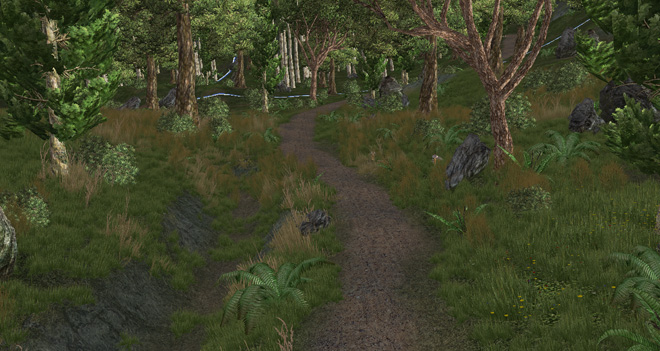
Creating your flora artworkFlora configurationFlora placement, noise and weightMiscellaneous xml tags Art and performance tipsFlora is the millions of small objects populating the landscape, providing detail and depth to the landscape. Typical flora objects include grass, stones, small ferns, and flowers. They are automatically created as the player moves around the world, and fade based on distance.
An Ecotype, as referred to in this document, is another name for a type of ecosystem. In your world, ecotypes are linked to terrain textures. Wherever a particular texture is used, you will find the associated flora growing there.
 Creating your flora artworkFlora texture size and polycount
Flora objects are simply standard static .visual files, created in
a 3d application, and exported using BigWorld's Visual Exporter.
Ecotypes are groups of visual files associated with a particular terrain texture. For example the terrain texture "grass.tga" might have 10 different grass like models (visuals) associated with it.
Flora triangle density:
The number of flora triangles drawn by the engine depends on the vertex buffer setting <vb_size> in the flora.xml file, this specifies the number of bytes available for the vertex buffer. The default setting is 5,000,000, this is then multiplied by the graphics setting "flora density"
Very High Flora has a multiplier of 6 so the vertex buffer will be 30,000,000 bytes
High Flora has a multiplier of 1 so the vertex buffer will be 5,000,000 bytes
Medium Flora has a multiplier of 0.5 so the vertex buffer will be 2,500,000 bytes
Low Flora has a multiplier of 0.25 so the vertex buffer will be 1,250,000 bytes
Ecotype triangle limit:
There is also an internal triangle limit per each ecotype which is again dependant on the vertex buffer and flora density graphics settings.
To work out the number of triangles available to each ecotype you can do the following:
Number of triangles available to each ecotype = ( ( ( vb_size in bytes ) * graphics setting ) / 625 ) / 16 ) / 3
625 = number of 4x4 flora blocks
16 = bytes per vertex
3 = verts in a triangle
Or put more simply; vb_size * graphics setting / 30,000 which gives you the following table.
| Flora Detail Level | Number of Triangles per Ecotype |
|---|---|
| Very High Flora | 960 triangles per ecotype set |
| High Flora | 160 triangles per ecotype set
|
| Medium Flora | 80 triangles per ecotype set |
| Low Flora | 40 triangles per ecotype set |
So when using High Flora density the total number of triangles making up an ecotype should be no more than 160 triangles – In the game, there will be 160 triangles of flora drawn for each 4x4m block of terrain (1 terrain quad).
As an example, if your grass ecotype consisted of the following;
<flora.xml>
  ...
  <ecotypes>
    ...
    <gra_grass_long>
      <texture>   maps/landscape/gra_grass_02.dds       </texture>
      <visual>    grassland/flora/flower.visual </visual> <!-- A 100 triangle flower model -->
      <visual>    grassland/flora/shrub.visual </visual> <!-- An 80 triangle shrub model -->
  ...
then your shrub model will not be drawn at high flora density settings because the 160 triangle limit would of been exceeded.
Flora object density:
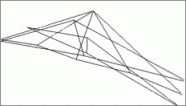
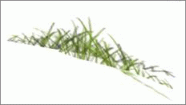
Using higher polycount objects isn't necessarily better. The more polygons in each object the fewer objects can be drawn per 4x4m flora block.
You could draw one extremely detailed flora object per block or like in the example below use simpler objects to get a more dense flora cover.
Flora Texture size:
Within a single ecotype, all flora objects must use a single bitmap.
The size of each ecotype bitmap is defined by the <texture_width> X </texture_width> and <texture_height> Y </texture_height> tags in the flora.xml file.
The default settings are 512x256. Exceeding 512x512 is not recommended.
If it is your intention to have grass and flower flora growing on
the greengrass ecotype, then both grass and flowers must be drawn
on the same bitmap.
There can be more than one flora object per ecotype, but each ecotype can have only 1 texture.
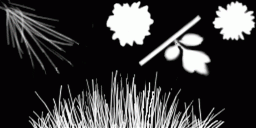
Flora is drawn with full alpha-blending enabled, so make sure that you use the alpha channel to its fullest extent.
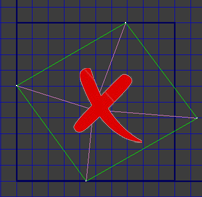
Below is an example of a flora texture and its alpha channel. As you can see, multiple objects can be displayed within the one ecotype, provided they use the same bitmap and some careful UV mapping.

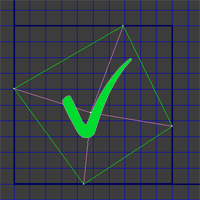
Flora UV coordinatesWhen creating the flora UV's it's important to remain inside the 0,1 boundary of the UV coordinates. The flora system compounds multiple flora bitmaps into a large texture, if your UV's stray outside the 0,1 boundary the flora model may borrow texture from a neighbouring bitmap.
Flora configurationFlora.xmlWorldEditor automatically seeds the world with the flora that you created. In order to do this, you must correctly configure the game.
The space.setting file located in each space folder contains a tag <flora> describing the location of that particular space's flora.xml file. This allows you to define different flora rules per space.
If a space's space.settings file does not contain a <flora> tag then the space will default to the flora.xml described by the resources.xml. In the case of the FantasyDemo this flora.xml is located in res/environments
Your flora configuration file is specified in bigworld/res/resources.xml's file, in the <environment> section's <floraXML> tag.
You can change this setting to another location for your game, if you like.
<resources.xml>
  ...
  <environment>
    ...
    <floraXML> system/data/flora.xml </floraXML>
  ...
The ecotypes present in your world can then be configured in the flora
configuration file (in the example above, system/data/flora.xml),
in the <ecotypes> tag. Examples of ecotype that you might
have are: grass, arid grass, swamp mud, water verge, dusty path, etc...
<flora.xml>
  ...
  <ecotypes>
    ...
    <gra_grass_long>
      <texture>   maps/landscape/gra_grass_02.dds       </texture>
      <texture>   maps/landscape/lev_grass_02.dds       </texture>
      <visual>    grassland/flora/gra_grass_long.visual </visual>
  ...
Each ecotype has the following information:
 A list of terrain textures to
use in WorldEditor. This list represents all terrain textures that will have
this particular ecotype growing upon it.
A list of terrain textures to
use in WorldEditor. This list represents all terrain textures that will have
this particular ecotype growing upon it.
A list of visuals. This is the
list of meshes that will grow in that ecotype. Within this list, all visuals
must use the same texture.
When adding ecotypes, always add it to the bottom of the list – this will save you from having to recalculate the ecotypes for the entire world again.
In the example configuration above, the gra_grass_long.visual will grow wherever in the world the predominant texture is gra_grass_02.dds.
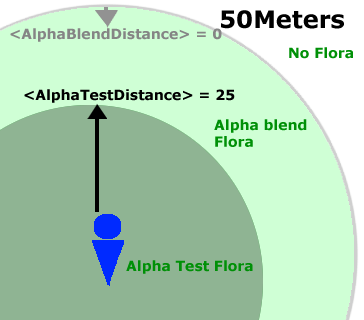
Flora draw distancesFlora is drawn using alpha blend (8 bit alpha) which softly fades the flora in and out of view, and predominatly alpha test (1 bit alpha) when close to the player.
Here are the settings from the flora.xml file for fantasy demo.
<AlphaTestRef>			128			</AlphaTestRef>
<ShadowAlphaTestRef>		128			</ShadowAlphaTestRef>
<AlphaTestDistance>		25			</AlphaTestDistance>
<AlphaBlendDistance>		0			</AlphaBlendDistance>
<AlphaTestFadePercent>		75			</AlphaTestFadePercent>
<AlphaBlendFadePercent>		50			</AlphaBlendFadePercent>...
Flora will draw to a maximum of 50 meters from the player. Using the above default settings, alpha tested flora will be drawn 25 meters from the player and alpha blended flora will be drawn out to the 50 meter mark.
<AlphaBlendDistance> Is measured from the 50 meter mark towards the player. So when set to the default 0, the flora will use alpha blend all the way out to the 50 meter mark.
<AlphaTestDistance> determines how far out from the player that alpha test should be used. So when set 25 the flora will be drawn using alpha test 25 meters from the player.
Flora placment, noise and weightFlora noiseFlora such as grass, flowers, and ferns do not grow evenly dispersed around the world. Instead, they clump together in some places, and do not grow in others.
To simulate this, we have added the ability to add noise to the distribution
of flora, via the <generator> tag, as illustrated below:
<flora.xml>
  ...
  <ecotypes>
    ...
    <gra_grass_long>
      ...
      <generator> chooseMax
	<fixed>
		<value> 1.1 </value>
	</fixed>
        <noise>
          <frequency> 0.15 </frequency>
          <generator> visual
            <visual> flora/dry_grass/flower_3_tris_stem_1_tris02.visual    </visual>
            <visual> flora/dry_grass/flower_3_tris_stem_1_tris.visual      </visual>
          </generator>
        </noise>
        <noise>
          <frequency> 0.8 </frequency>
          <generator> visual
            <visual> flora/dry_grass/grass_upsidedown_2_tris.visual        </visual>
            <visual> flora/dry_grass/grass_upsidedown_1_tris.visual        </visual>
            <visual> flora/dry_grass/grass_upsidedown_1_tris02.visual      </visual>
            <visual> flora/dry_grass/grass_upside_upsidedown_2_tris.visual </visual>
            <visual> flora/dry_grass/grass_3_tris.visual                   </visual>
          </generator>
         </noise>
         <noise>
           <frequency>  4.0 </frequency>
           <generator> visual
             <visual> flora/dry_grass/grass_upsidedown_1_tris02.visual      </visual>
             <visual> flora/dry_grass/grass_upside_upsidedown_2_tris.visual </visual>
             <visual> flora/dry_grass/flower_3_tris_stem_1_tris02.visual    </visual>
             <visual> flora/dry_grass/flower_3_tris_stem_1_tris.visual      </visual>
           </generator>
         </noise>
  </generator>
       ...
The following diagram displays graphically what is occuring in the above noise generator.
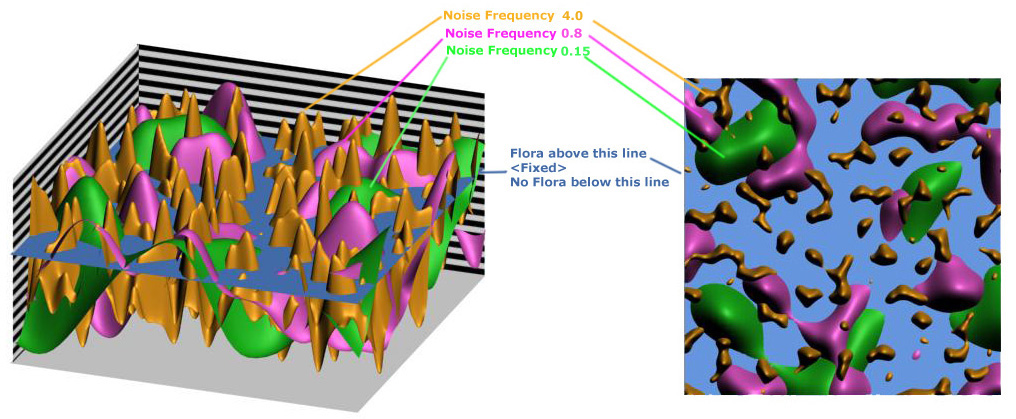
The <generator> is Choosing the Maximum "choosemax" values above the <fixed> level to place flora objects.
So in the image to the right, blue indicates no flora and the other indicate flora comprised of the visuals listed in the above .xml.
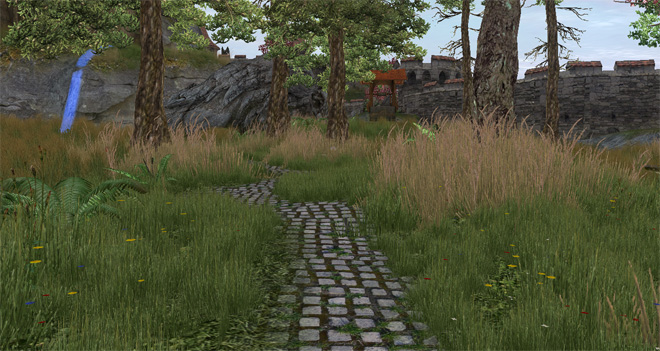
Keeping flora off paths, the weight tagThe above noise settings can sometimes cause your flora objects to creep into places that you have defined as <empty> ecotypes within the flora.xml file. This usually manifests as flora growing on paths or roads.
This can be fixed using the <weight> tag found inside the material_kinds.xml file (bigworld\res\system\data\material_kinds.xml)
<kind>
		<id>	9	</id>
		<desc>	Dirt	</desc>
		<sound> dirt    </sound>
		<weight>	1.0	</weight>
		<help> Hard crunchy snow. </help>
		<sfx>	sets/global/fx/sfx/sfx_pchang_dirt.xml </sfx>
		<terrain> maps/landscape/path01 </terrain>
		<terrain> maps/landscape/path02
		<weight>	4.0	</weight>
		</terrain>
		<terrain> maps/landscape/path03 </terrain>
</kind>
To get a good understanding of how the <weight> tag works you must first understand Texture Blend Maps and Flora Blend Maps
Texture and Flora Blend Maps:
The resolution of the terrain texture brush is determined by the Texture Blend Map settings used when the space was initially created.
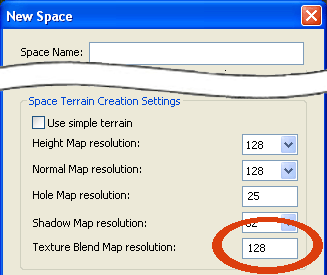
The engine uses a similar blend map, the Flora Blend Map to decide what ecotype is going to be placed in a given location. The resolution of this Flora Blend Map is always half the resolution of the Texture Blend Map for advanced terrain, and full size for simple terrain.
The <weight> tag mentioned above simply multiplies the value of a given texture in the Flora Blend Map. So when we give the texture path02.tga a weight tag of 4.0 its effect in the flora blend map is 4 times as strong as the other textures, preventing flora from creeping into its territory.
Note: For further uses of the material_kinds.xml file please read Terrain Material Kinds
Miscellaneous xml tags Here are several other tags useful xml tags associated with flora
<vb_size> This tag controls the size of a vertex buffer which will determine how many flora objects can be shown at once depending on its size. Larger values result in more flora but come at a performance cost.
<flex> 0.0 </flex> Determines how much the flora object is effected by the in game wind. 0 = no effect, 1.0 = full effect.
<density> 0.8 </density> Can be used to control how often a flora object is placed on the terrain. Valid values are between 0 and 1.0. This will not increase the total amount of flora, only scale it back from its maximum (1.0) value. To increase the overall amount of flora see the tag <vb_size>.
<scaleVariation> 0.7 </scaleVariation> Applies a random scale variation factor to the flora object. A scaleVariation value of 0.5 will cause an object of size 1.0m to be drawn between 0.5m and 1.5m tall.
<weight> 5 </weight> This tag is found within the material_kinds.xmlfile located bigworld\res\system\data\material_kinds.xml although not located in the flora.xml file it does affect the way flora is placed on the ground. All ecotypes have a certain amount of creep, i.e. they will spread into other areas, the <weight> tag can be used to prevent other ecotypes from invading a particular ecotype. High values will prevent other ecotypes from creeping into the area defined by this ecotypes texture. This is useful for preventing grass growing on paths for example.
Art and performance tipsWhen creating and placing the flora, keep in mind the following:
The impact in the game's
performance will be directly related to how many pixels are drawn on the screen
– the vertex cost is negligible.
Therefore, make sure that your detail objects do not cover too many pixels, i.e., do not make thick head - high grass unless you know exactly what you are doing.
The colour of the detail
objects is very important.
Since you want them to fade out seamlessly, and you do not want to see the intersection between the objects and the ground, make sure that the texture colour matches exactly the colour of the terrain on which each detail object sits.
Obviously, you can add more colour variation in towards the top of the object, as this will not be sitting directly on the ground. For example, the stems of flowers should exactly match the colour of the ground on which they are sitting, while the petals can be bright and bold.
Slightly darken the alpha map of your flora objects where they intersect with the ground. This tends to hide the intersection, and also blends the colours of the flora with the colour of the terrain.
Variety is also very important,
so try to fit as many different visuals into the one ecotype (i.e., on
the one ecotype texture).
Small variations in a grass object can add a lot to the realism of your flora.
Flora density is not only controlled by the vertex buffer size but also by the number of triangles in each visual.
Copyright 1999-2011 BigWorld Pty. Ltd. All rights reserved. Proprietary commercial in confidence.