Material properties
- Material Kinds
 BigWorld shaders
- Creating a rolling UV material
- Saving a material MFM file
Material propertiesMaterial KindsBigWorld shadersCreating a rolling UV materialSaving a material MFM fileThe *.fx files are a way of defining how an object is rendered
within the BigWorld engine.
The *.mfm, or material files, are meta-data files that contain
artist-editable features, including FX file, shader properties, and texture
references. ModelEditor can create new material files that can be assigned to
mesh objects.
 Material properties
Bitmaps and artist-editable features are assigned and accessed by
ModelEditor's Materials Settings panel. The available properties are
determined by the type of BigWorld Shader (.fx) used.
The table below describes the most common properties shared between several materials:
| Property | Description |
|---|---|
| Collision Flags |
|
| Material Kind |
Used for assigning particular sounds and particle systems to objects.
A wooden barrel should play a wood sound and emit wooden particles when shot at, for example. The default setting (Use Visual's) uses the visual file's material kind. material kinds are defined in New material kinds can be created by simply adding a new <kind> tag. <kind> |
| Texture Operation | Describes the mathematical functions used to blend textures together. |
| vTransform/uTransform | This property is described in lesson Create a New Material, section Creating a rolling UV material. |
| Alpha Reference |
Value at which an alpha-tested material reads a greyscale image as values of 1
or 0. Value range is between 0 and 255.
A value of 200 will read all areas of an image with a value greater than 200 as white, and all areas below it as black. |
| Alpha Test | Determines whether the alpha map of the material should be used. |
| Double Sided | Indicates whether the material can be seen from both sides. |
| Self Illumination | Intensity with which the material should be illuminated as if it was a light source. |
| Light Enable |
Indicates whether the material will receive lighting.
If set to False, then the texture's original colour will be displayed. |
| Diffuse Map |
Bitmap file containing the object's colour information.
The file must be 8-bits-per-channel RGB of format |
| Specular Map |
Bitmap file containing specular colour and value information.
White areas represent specular highlights brighter than darker areas. |
| Normal Map |
Used to add fine details to shading, by representing normal
direction – green = up, red = right, blue = height.
File must be 8-bit RGB |
| Sub Surface Map |
Bitmap file containing the object's subsurface colour information. Alpha channel
controls the amount of subsurface scattering.
The file must be 8-bits-per-channel RGB of format |
| Glow Map | File containing information for self-illumination simulation.
The file must be 8-bits-per-channel RGB of format |
| Reflection Map | Bitmap file containing an image to be used as a reflection upon the applied
object.
|
| Mask Map | Bitmap file containing an image that masks out the effect of some part of the current shader |
Material KindsThe file bigworld/res/system/data/material_kinds.xml contains the current set of predefined material kinds, and can be edited to customise the available material kinds, which are listed below:
▪ None (Default)
▪ Wood
▪ Stone
▪ Chain
▪ Light metal
▪ Heavy metal
▪ Glass
▪ Dirt
▪ Grass
▪ Snow
	<kind>
		<id>	1	</id>
		<desc>	Wood	</desc>
		<sound> wood    </sound>
		<help> Dull surfaces, not very reactive. </help>
		<sfx>	sets/global/fx/sfx/sfx_pchang_wood.xml </sfx>
	</kind>
Material Kinds allow you to script different sounds, effects, etc depending on what material is being interacted with.
Terrain textures can also be assigned a Material Kind
BigWorld shadersBigWorld ships with some commonly used shaders, which can be found in the
bigworld/res/shaders/std_effects folder.
The table below describes all standard shaders (FX files) included with BigWorld, and their common uses. New FX files can be added, provided they use the BigWorld lighting model.
| File | Description | |||||
|---|---|---|---|---|---|---|
normalmap.fx |
Objects with normal and diffuse maps. Bone deformation animations are performed on CPU. Object is affected by pre-calculated static lighting. | |||||
normalmap_skinned.fx |
Objects with normal and diffuse maps. Soft-skinned (each vertex may have up to three bones influencing it) animations are performed on GPU. Object is affected by pre-calculated static lighting. | |||||
normalmap_glow.fx |
Objects with normal, diffuse, and glow maps. Bone deformation animations are performed on CPU. Object is affected by pre-calculated static lighting. | |||||
normalmap_chrome.fx |
Objects with normal, diffuse, and cube reflection maps. Bone deformation animations are performed on CPU. Object is affected by pre-calculated static lighting. | |||||
normalmap_chrome_skinned.fx |
Objects with normal, diffuse, and cube reflection maps. Soft-skinned (each vertex may have up to three bones influencing it) animations are performed on GPU. Object is affected by pre-calculated static lighting. | |||||
normalmap_glow_alpha.fx |
Objects with normal, diffuse (including alpha blend transparency, values of 1 to 256), and glow maps. Bone deformation animations are performed on CPU. Object is affected by pre-calculated static lighting. | |||||
normalmap_chrome_glow.fx |
Objects with normal, diffuse, glow and cube reflection maps. Bone deformation animations are performed on CPU. Object is affected by pre-calculated static lighting. The reflection mask defines areas of reflectivity – white areas are highly reflective, dark areas are not. | |||||
normalmap_glow_skinned.fx |
Objects with normal, diffuse, and glow maps. Soft-skinned (each vertex may have up to three bones influencing it) animations are performed on GPU. Object is affected by pre-calculated static lighting. | |||||
normalmap_specmap.fx |
Objects with normal, diffuse, and specular maps. Bone deformation animations are performed on CPU. Object is affected by pre-calculated static lighting. | |||||
normalmap_specmap_alpha.fx |
Objects with normal, diffuse (including alpha blend transparency, values of 1 to 256), and specular maps. Bone deformation animations are performed on CPU. Object is affected by pre-calculated static lighting. | |||||
normalmap_specmap_chrome.fx |
Objects with normal, diffuse, specular maps and cube reflection maps. Bone deformation animations are performed on CPU. Object is affected by pre-calculated static lighting. | |||||
normalmap_specmap_chrome_skinned.fx |
Objects with normal, diffuse, specular maps and cube reflection maps. Soft-skinned (each vertex may have up to three bones influencing it) animations are performed on GPU. Object is affected by pre-calculated static lighting. | |||||
normalmap_specmap_chrome_glow.fx |
Objects with normal, diffuse, glow maps and cube reflection maps. Bone deformation animations are performed on CPU. Object is affected by pre-calculated static lighting. | |||||
normalmap_specmap_chrome_glow_skinned.fx |
Objects with normal, diffuse, glow maps and cube reflection maps. Soft-skinned (each vertex may have up to three bones influencing it) animations are performed on GPU. Object is affected by pre-calculated static lighting. | |||||
normalmap_chrome_glow_skinned.fx |
Objects with normal, cube reflection and glow maps. Soft-skinned (each vertex may have up to three bones influencing it) animations are performed on GPU. Object is affected by pre-calculated static lighting. | |||||
normalmap_specmap_skinned.fx |
Objects with normal, diffuse, and specular maps. Soft-skinned (each vertex may have up to three bones influencing it) animations are performed on GPU. Object is affected by pre-calculated static lighting. | |||||
colourise_add.fx |
Objects with diffuse map. Bone deformation animations are performed on CPU. Object is affected by pre-calculated static lighting. A single colour picker affects additively the object's existing colour. | |||||
colourise_normalmap_specmap_skinned.fx
|
Objects with diffuse, and mask maps. Soft-skinned (each vertex may have up to
three bones influencing it) animations are performed on GPU. Object is affected
by pre-calculated static lighting. Channels of mask map used to select regions
of diffuse map for colourisation.
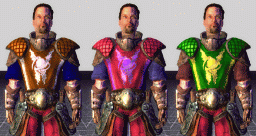
This shader is perfect for creating customisable character variations. Each channel of the mask map can define an area to be colourised. Because the shader multiplies the customised colour with the existing diffuse colour, it is best to paint those sections to be colourised with almost 0 saturation (no colour), then brighten them somewhat, as the shader will only make them darker. (See diffuse image below). The
3 colour variations done with the shader
| |||||
distort.fx |
Objects with distortion (normal map), diffuse, and reflection (cube map). Bone deformation animations are performed on CPU. Object is affected by pre-calculated static lighting. The shader contains many editable parameters which can dramatically alter the appearance of the object it is applied to. Fresnel falloff and fresnel constant control the way in which reflections fade off as a function of the viewing angle. Reflection amount controls the reflectivity of the object, or how much of the cube map is displayed on the object's surface. Distortion scale controls how strong the distortion map affects the scene behind the object – be sure to use a normal map as the distortion map. This shader is great for semi-transparent objects that will distort the scene behind them. The classic example is stained glass or water. Alpha test option will only work when the Use Diffuse Map option is set to True | |||||
lightonly.fx |
Objects with a diffuse map (including alpha test transparency, values of 1 or 0 only). Bone deformation animations are performed on CPU. Object is affected by pre-calculated static lighting. | |||||
lightonly_alpha.fx |
Objects with a diffuse map (including alpha blend transparency, values of 1 to 256). Bone deformation animations are performed on CPU. Object is affected by pre-calculated static lighting. | |||||
lightonly_chrome.fx |
Objects with a diffuse map and transparency (within alpha blend, values of 1 to 256). Bone deformation animations are performed on CPU. Object is affected by pre-calculated static lighting. The alpha map of the diffuse channel defines areas of reflectivity – white areas are highly reflective, dark areas are not. | |||||
lightonly_chrome_add.fx |
Objects with diffuse and additive reflective map. The combined diffuse and reflection map adds to the background. Used in special effects, explosions, and glass windows. Bone deformation animations are performed on CPU. Object is affected by pre-calculated static lighting. The alpha map of the diffuse channel defines areas of reflectivity – white areas are highly reflective, dark areas are not. | |||||
lightonly_chrome_alpha.fx |
Objects with diffuse (including alpha blend transparency, values of 1 to 256) and reflection map. Bone deformation animations are performed on CPU. Object is affected by pre-calculated static lighting. | |||||
lightonly_vertexcolour.fx |
Objects with a diffuse map and vertex colourisation support. Bone deformation animations are performed on CPU. Object is affected by pre-calculated static lighting. | |||||
lightonly_dual.fx |
Objects with two diffuse maps. Diffuse map 1 uses UV channel 1, diffuse map 2 uses UV channel 2. Bone deformation animations are performed on CPU. Object is affected by pre-calculated static lighting. | |||||
lightonly_dual_multiply.fx |
Objects with two diffuse maps. Diffuse map 1 uses UV channel 1, diffuse map 2 uses UV channel 2 and is multiplied with difuse map 1. Bone deformation animations are performed on CPU. Object is affected by pre-calculated static lighting. Commonly used for baked ambient occlusion or baked shadow maps, |
|||||
lightonly_glow.fx |
Objects with diffuse and glow map. Bone deformation animations are performed on CPU. Object is affected by pre-calculated static lighting. | |||||
lightonly_glow_alpha.fx |
Objects with diffuse map (including alpha blend transparency, values of 1 to 256), and glow map. Bone deformation animations are performed on CPU. Object is affected by pre-calculated static lighting. | |||||
lightonly_normal |
Objects with diffuse map, and an additive texture projected from the camera space normals. Bone deformation animations are performed on CPU. Object is affected by pre-calculated static lighting. | |||||
lightonly_normal_add.fx |
Objects with diffuse map, and an additive texture projected from the camera space normals. Blends additively with the background. Bone deformation animations are performed on CPU. Object is affected by pre-calculated static lighting. | |||||
lightonly_normal_alpha.fx |
Objects with diffuse map (including alpha blend transparency, values of 1 to 256), and an additive texture projected from the camera space normals. Bone deformation animations are performed on CPU. Object is affected by pre-calculated static lighting. | |||||
lightonly_projection.fx |
Objects with diffuse map, and an additive reflection texture mapped from world space. World space texture will stay still even as object moves around the world. Bone deformation animations are performed on CPU. Object is affected by pre-calculated static lighting. | |||||
lightonly_projection_add.fx |
Objects with diffuse map, and an additive reflection texture mapped from world space. World space texture will stay still even as object moves around the world. Blends additively with background. Bone deformation animations are performed on CPU. Object is affected by pre-calculated static lighting. | |||||
lightonly_projection_alpha.fx |
Objects with diffuse map (including alpha blend transparency, values of 1 to 256), and an additive texture mapped from world space. World space texture will stay still even as object moves around the world. Bone deformation animations are performed on CPU. Object is affected by pre-calculated static lighting. | |||||
lightonly_skinned.fx |
Objects with diffuse map. Soft-skinned (each vertex may have up to three bones influencing it) animations are performed on GPU. Object is affected by pre-calculated static lighting. | |||||
lightonly_uvtransform.fx |
Objects with diffuse map, and an additive texture with rolling UVs. Bone deformation animations are performed on CPU. Object is affected by pre-calculated static lighting. | |||||
lightonly_uvtransform_add.fx |
Objects with diffuse map, with rolling UVs. Blends additively with the background. Bone deformation animations are performed on CPU. Object is affected by pre-calculated static lighting. | |||||
lightonly_uvtransform_alpha.fx |
Objects with diffuse map (including alpha blend transparency, values of 1 to 256), and an additive texture with rolling UVs. Bone deformation animations are performed on CPU. Object is affected by pre-calculated static lighting. | |||||
lightonly_uvtransform2.fx |
Objects with diffuse map, and an additive texture with rolling UVs. Primary diffuse map also has rolling UVs. Bone deformation animations are performed on CPU. Object is affected by pre-calculated static lighting. | |||||
lightonly_uvtransform2_add.fx |
Objects with diffuse map, with rolling UVs .Primary diffuse map also has rolling UVs. Blends additively with the background. Bone deformation animations are performed on CPU. Object is affected by pre-calculated static lighting. | |||||
lightonly_uvtransform2_alpha.fx |
Objects with diffuse map (including alpha blend transparency, values of 1 to 256), and an additive texture with rolling UVs. Primary diffuse map also has rolling UVs. Bone deformation animations are performed on CPU. Object is affected by pre-calculated static lighting. | |||||
lightonly_uvtransform2_alpha_mask.fx |
Objects with diffuse map (including alpha blend transparency, values of 1 to 256), and an additive texture with rolling UVs. Primary diffuse map also has rolling UVs. A mask map controls the transparency of the primary texture. Bone deformation animations are performed on CPU. Object is affected by pre-calculated static lighting. Commonly used for water effects | |||||
lightonly_add |
Objects with diffuse map, and an additive texture. Bone deformation animations are performed on CPU. Object is affected by pre-calculated static lighting. | |||||
parallax_lighting_specmap.fx |
Objects with diffuse, normal, specular, and displacement (height) maps. Displaces UV coordinates as a function of the heightmap away from the camera view. Gives the appearance of 3D geometry. Best used on flat/semi-flat objects, such as brick walls. Commonly referred to as parallax or displacement mapping. Bone deformation animations are performed on CPU. Object is affected by pre-calculated static lighting. Note: The displacement map is stored in the alpha channel of the normal map. | |||||
shimmer.fx |
A transparent heat like shimmer effect, commonly seen above heat sources. Alpha channel defines localised shimmer intensity. The opacity parameter affects the overall intensity. Requires a diffuse map. Bone deformation animations are performed on CPU. Object is not affected by pre-calculated static lighting. | |||||
spintoface_add.fx |
Objects with diffuse map. Blends additively with the background. Object will spin to face the camera. Bone deformation animations are performed on CPU. Object is not affected by pre-calculated static lighting. | |||||
stdinclude.fx |
Utility FX file not used by artists – it has components referenced by all other FX files. | |||||
subsurface_skinned.fx |
Objects with diffuse, specular, and sub surface maps. The skinned version performs soft-skinning on GPU (each vertex may have up to three bones
influencing it).
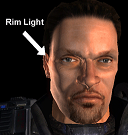
This advanced shader uses the angle of light and camera to simulate the sub-surface scattering that occurs when light enters skin. It also simulates rim/bounced lighting, by increasing the luminance of the side of the model facing away from the primary light source. The amount of the sub-surface scattering is controlled by the alpha channel of the sub surface map, and its colour is controlled by the RGB channels.
As well as simulating sub-surface scattering, these shaders simulate bounced light on the non-illuminated side of the object. The rim lighting strength and angle is controlled by the Rim Strength and Rim Width settings. When painting a sub surface map for human skin, consider the thickness of the surface – thicker parts end up dark red, while membranes and areas next to bone end up light orange.
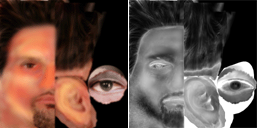
Gradient of colour used to define areas – from thicker areas (left) to thinner membranes (right)
Example sub surface map and its alpha channel Areas of thick skin and flesh are dark red, while areas close to the bone are light orange. Dark areas of the alpha map (such as the hair and beard) reduce the amount of sub-surface scattering. |
|||||
ambient_skylight_skinned.fx
|
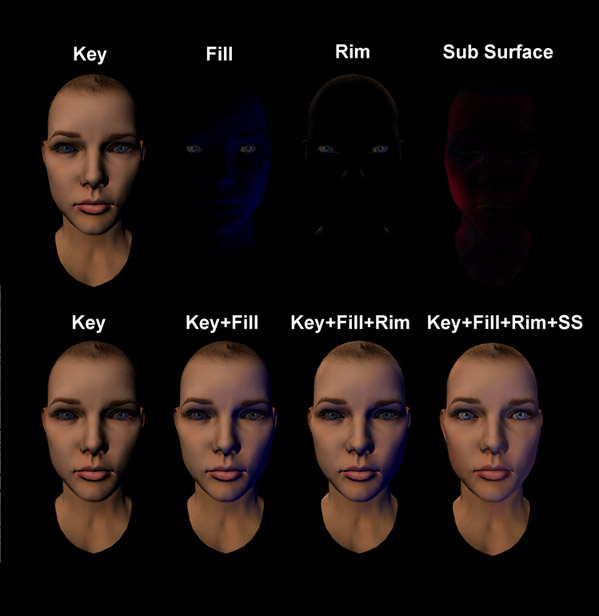
Objects with diffuse, specular, and sub surface and mask maps. performs soft-skinning on GPU (each vertex may have up to three bones influencing it). This shader creates two lights (See image, Key and Fill) that illuminate the object in camera space. The effect of these lights on the model is inversely modulated depending on the proximity of dynamic lighting. Therefore if there is no scene lighting your model will be lit using the lighting setup defined in the shader.
Channels of mask map used to select regions of diffuse map for colourisation. This advanced shader uses the angle of light and camera to simulate the sub-surface scattering that occurs when light enters skin. It also simulates rim/bounced lighting, by increasing the luminance of the side of the model facing away from the primary light source. The amount of the sub-surface scattering is controlled by the alpha channel of the sub surface map, and its colour is controlled by the RGB channels.
|
Multiple UV's and Vertex Colour BigWorld supports multiple UV's and Vertex colour exported from both 3dsMax and Maya
The shader lightonly_dual.fx supports multiple UV's and is intended as an example on top of which more complex multiple UV shaders can be written by your team. Information on how to create dual UV's can be found here
The shader lightonly_vertexcolour.fx supports vertex colour information and is intended as an example on top of which more complex vertex colour shaders can be written by your team. Information on how to create vertex colour can be found here
Skybox shaders Information regarding the use of skybox shaders can be found here
How to choose the correct shaderWhen choosing a shader there are several questions you should ask yourself:
 Do I want to use normal-mapped
or standard lighting?
Do I want to use normal-mapped
or standard lighting?
Shaders with the normalmap inclusion will
use normal maps to calculate their lighting; shaders with the
lightonly inclusion will use standard lighting.
Do I want to use Glow,
Chrome, Rolling UVs?
Shaders with the glow inclusion use a glow map to
self-illuminate the object; shaders with the chrome inclusion use
a cube reflection map to simulate reflections from the environment; shaders with
the uvtransform inclusion contain parameters to allow rolling UV
coordinates.
Do I want to use Alpha Test
or Alpha Blend?
Shaders with the alpha inclusion use the diffuse
map's alpha channel for opacity, enabling blend values from 1 to 256 (8-bit).
Please note that many other non alpha shaders contain
alpha test, which will clamp the blend value to either 1 or 0 (2-bit) as defined
the by the shader's alpha reference setting. If the alpha reference setting is set to 128, then all values above 128 will be regarded as a blend value of 1 (opaque) and all the values below will be regarded as a blend value of 0 (transparent).
Does your object have allot of self-intersection? When using alpha blended shaders self-intersection can lead to artifacts in the polygon sorting.
Alpha blended shaders do not use GPU skinning, so if your alpha blended model is skinned all animations will occur on the CPU (slower).
When possible use alpha test rather than blend. Alpha blended objects require sorting, excessive use of blended shaders will result in poor game performance.
Do I want to use Skinned,
or Static?
Shaders with the skinned inclusion perform
soft-skinning (each vertex may be influenced by up to three bones) on the GPU.
Objects using 3ds Max's Skin, or Physique modifiers, or Maya's
Skinning should use a skinned shader.
Please note that it is extremely important that when choosing a
shader for a skinned object, that you use a skinned shader. Skinned
shaders perform bone translations on the GPU, which is a much faster way than
the alternate (CPU). If the CPU is forced to calculate animations, there may be
a performance hit.
Are there going to be
performance issues?
This is probably the most important, yet least thought of question. The more advanced shaders (those that use normal maps, subsurface and parallax mapping) are more costly in performance terms when compared with those that do not. Use these shaders wisely.
Should I create my own
shaders?
Ultimately, we cannot offer every combination of shader available, because the list is infinite. Most customers will choose to create several of their own shaders for special case purposes.
How to apply a shader in ModelEditorFrom ModelEditor's Asset Browser panel, select the Effects virtual folder. This gives you access to all BigWorld shaders.
To apply a shader to a model, simply drag it in the Material Settings panel's Effect drop-down list box.
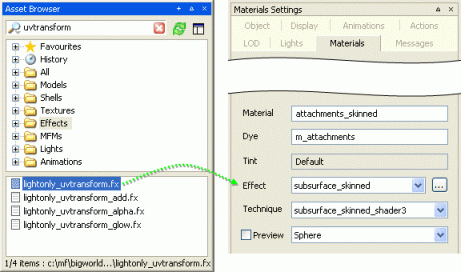
BigWorld shaders can also be directly applied to models within 3dsMax (not supported for Maya). For information on how to do this, see the Create and Export a Static Object in 3ds Max and Maya lesson's Apply BigWorld shaders directly to 3ds Max models section.
Creating a rolling UV materialThe series of shaders with suffix uvtransform, such as
lightonly_uvtransform.fx, allow the artist to create a rolling UV
effect. To create this effect on your object simply drag a
uvtransform shader from the Asset Browser pane's
Effects virtual folder into the Material Settings panel's
Effects drop-down list box.
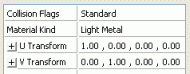
Choose a texture map that you want to roll across the surface by double-clicking the Transform Map property in the Material Settings panel. Alternatively, you can drag one from the Asset Browser panel.
The vector properties allow you to control the tiling, offset, speed and direction of the rolling UVs.
The UV tiling is determined by the first value in the U Transform property and by the second value in the V Transform property. A value of 2 will cause the texture to be tiled twice over the normal UV range.
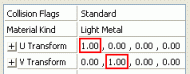
The rotational offset of the UV coordinates is determined by the second value in the U Transform property and by the first value in the V Transform property.
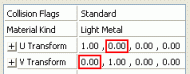
The scroll speed of the moving texture is determined by the third value in the U Transform and the V Transform properties.
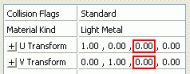
The initial UV offset of the texture is determined by the fourth value in the U Transform and the V Transform properties.
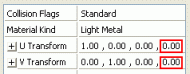
Saving a material MFM fileAn existing model's material settings can be saved as a .mfm
file. This allows artists to store complex material setups to be applied on
different models.
1 Select the Material Settings panel.
2 Select the material that you wish to save as an MFM.
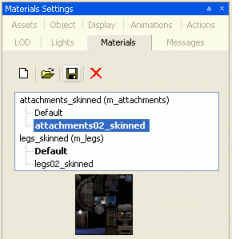
3 click the
 button – this
will open the Save As dialog box.
button – this
will open the Save As dialog box.
4 In the Save As dialog box, specify the folder and the name of the material file that you want to save, then click the Save button.
To apply an MFM file to an existing material, click the
 button and select the
desired file.
button and select the
desired file.
Copyright 1999-2011 BigWorld Pty. Ltd. All rights reserved. Proprietary commercial in confidence.